VPN servers help in many aspects: They encrypt our web traffic, preventing it from being observer by unwanted others. They can also enable us reach blocked websites. Even though internet should be free (as in free speech), in some countries this is not the case. By using a VPN server, we first connect to that server, and then the server connects to the websites on behalf of us.
For example, assume you connect to a VPN server in USA, such as the one offered by Ace VPN. Let us also assume you normally cannot access X website since it is blocked by your internet provider in your country. Now, what happens is that, the Ace VPN server connects to the X website on your behalf, and then redirects all the data to you, in an encrypted manner. This means, the blocking never works, since you actually never connected to the X website. Voila!
The Ace VPN service has three options:
Most free VPN services have very limited speeds. But, by offering both free and paid plans, Ace VPN manages to provide fast access speeds, and a highly avaiable service, with servers in multiple countries (including servers in USA, Canada, France, Germany, UK, Switzerland, and many others). Give it a try.
Friday, January 18, 2013


Saturday, September 4, 2010
Facebook serves the most ads in the USA
Websites are still searching for ways to monetise their ubiquity, but squaring this circle is fraught with dangers
Read the full article at: http://www.ft.com/cms/s/3/1f21f86c-5f33-11df-978c-00144feab49a.html
Wednesday, August 18, 2010
Best Last.fm alternatives
Recently Last.fm announced that they are charging subscription fees for all users outside US, UK, and Germany.
http://blog.last.fm/2009/03/24/lastfm-radio-announcement
Don't want to pay for something you have much better alternatives for? Yeah, right. Try these two:
Jango: A very nice service, with very good selection of music and similar (up-to-3) artist-based radio channels as Last.fm.
http://www.jango.com
AccuRadio: This is not an artist-based radio station, but the available channels are very well-picked, and you can even mix-and-match channels with their radio-builder now. Definitely worth a shot. Also try their iPhone/iPad app...
http://www.accuradio.com
Worth mentioning: thesixtyone
http://blog.last.fm/2009/03/24/lastfm-radio-announcement
Don't want to pay for something you have much better alternatives for? Yeah, right. Try these two:
Jango: A very nice service, with very good selection of music and similar (up-to-3) artist-based radio channels as Last.fm.
http://www.jango.com
AccuRadio: This is not an artist-based radio station, but the available channels are very well-picked, and you can even mix-and-match channels with their radio-builder now. Definitely worth a shot. Also try their iPhone/iPad app...
http://www.accuradio.com
Worth mentioning: thesixtyone
Saturday, August 14, 2010
Flipboard for iPad
I have waited this for a long time. Finally a nice way to read news, tweets, and facebook updates. Visually appealing, photos and videos supported, it is a must buy for iPad. Actually, Flipboard is FREE.
Sunday, April 11, 2010
It's TAX time
I have tried multiple online tax filing services, and decided that TaxSlayer is the best. Why?
http://www.taxslayer.com/
- It is cheap compared to others ($15 in total for federal and state E-FILE for 2009 returns, and you can keep your PDF copy).
- It is convenient (asks questions that direct you to deduct relevant expenses).
- It does the job.
http://www.taxslayer.com/
HP Slate TouchBook
Analyst: Nokia to launch Apple iPad rival
 Analysts predict a swathe of me-too slates from big PC and smartphone makers such as Nokia and Samsung
 Thursday, March 11, 2010
Lightweight Security for Windows
We all think alike. We want to keep our computers secure, but we do not want to use those extreme resource-consuming anti-virus or anti-malware programs. We basically do not want our computers to slow down to stay secure.
We have an option: We can employ lightweight security tools, and still stay secure (maybe not as secure, but good enough for most cases). I highly recommend the following two programs:
SpywareBlaster: Secures Internet Explorer and Firefox for free against known malicious websites to keep your computer uninfected.
http://www.javacoolsoftware.com/spywareblaster.html
a2free (a-squared): Free anti-virus and anti-malware detection and removal tool. The free version does not provide real-time protection, which means your computer will not slow down unintentionally. The scanning engine is good and very fast. Just run quick scan once in a while, if something is found, maybe try smart scan, and if you still suspect something, you can do a deep scan. You can also scan a single file or folder from the context menu.
http://www.emsisoft.com/en/software/free/
We have an option: We can employ lightweight security tools, and still stay secure (maybe not as secure, but good enough for most cases). I highly recommend the following two programs:
SpywareBlaster: Secures Internet Explorer and Firefox for free against known malicious websites to keep your computer uninfected.
http://www.javacoolsoftware.com/spywareblaster.html
a2free (a-squared): Free anti-virus and anti-malware detection and removal tool. The free version does not provide real-time protection, which means your computer will not slow down unintentionally. The scanning engine is good and very fast. Just run quick scan once in a while, if something is found, maybe try smart scan, and if you still suspect something, you can do a deep scan. You can also scan a single file or folder from the context menu.
http://www.emsisoft.com/en/software/free/
Monday, February 22, 2010
Browser wars in Europe
"According to usage-based statistics from Statcounter, Microsoft's IE has a 45.4% market share in Europe, followed by Mozilla Firefox (39.3%), Google Chrome (6.4%), Opera (4.3%), and Apple's Safari (3.7%)."
"If IE6 users are removed from Statcounter's statistics, then Firefox is already level with Internet Explorer (within 0.1%) in Europe, and the figures show that IE is in long-term decline."
Full post from the Guardian: http://www.guardian.co.uk/technology/blog/2010/feb/21/microsoft-windows-browser-ballot
iPhone Apps of the Week
Vancouver 2010 Olympics Official Guide: No explanations necessary.
iCall Voice over IP: Using this program, you can make free phone calls to all phones within USA. There is some lag during the call, but otherwise it is pretty good for a free service. It also integrates with your iPhone contacts.
World Customs and Cultures (by Hooked in Motion): This free program lists some basic information about cultures and customs of various countries. It lists some taboos, greeting styles, smoking/alcohol/drug laws, and views of time (punctuality). The information contained is fairly accurate based on my personal experience (in other words, it is "accurate enough").
iCall Voice over IP: Using this program, you can make free phone calls to all phones within USA. There is some lag during the call, but otherwise it is pretty good for a free service. It also integrates with your iPhone contacts.
World Customs and Cultures (by Hooked in Motion): This free program lists some basic information about cultures and customs of various countries. It lists some taboos, greeting styles, smoking/alcohol/drug laws, and views of time (punctuality). The information contained is fairly accurate based on my personal experience (in other words, it is "accurate enough").
Tuesday, February 9, 2010
iPhone Apps of the Week
Today ToDo: The best todo app out there. Easiest to use, but at the same time the most functional. Try the free version to see with your own eyes, and then go buy the pro version, it's worth the money.
Tweetdeck: Twitter client with Facebook support, and it's free. What else do you want?
Blogpress: To update your blog. I use the lite version and it does the job.
Tweetdeck: Twitter client with Facebook support, and it's free. What else do you want?
Blogpress: To update your blog. I use the lite version and it does the job.
Friday, January 29, 2010
Firefox 3.6 Chrome 4 Opera 10.5
We always wonder about speeds of different browsers. Here they are:
http://lifehacker.com/5457242/
ps: I'll try Opera 10.5 myself now!
http://lifehacker.com/5457242/
ps: I'll try Opera 10.5 myself now!
What sucks about the Apple iPad
Let's learn them from Gizmodo (I agree with almost all of it):
http://i.gizmodo.com/5458382/8-things-that-suck-about-the-ipad
http://i.gizmodo.com/5458382/8-things-that-suck-about-the-ipad
Friday, January 15, 2010
Finding best and free iPhone Apps
Of course you'd like to find the best applications available for iPhone, and find them cheap, or even better, for free!
There is an app for that!
appshopper.com
Enjoy the best iPhone apps cheap or for free!
There is an app for that!
- Bargain Bin with Push: You can set "watch prices". If a watched app goes on sale for below the watched price, you receive a push notification.
- Pandora Box: You see not only apps that have price drops, but also newly released apps.
- App Popular: You can track apps. If a tracked app has a change of price, you get a push notification.
appshopper.com
Enjoy the best iPhone apps cheap or for free!
Wednesday, December 23, 2009
Most visited wesites
Worldwide unique visitors (June, 2009). Source: comScore
1. Google Sites: 844 million
2. Microsoft Sites: 691 million
3. Yahoo! Sites: 581 million
4. Facebook: 340 million
5. Wikimedia Foundation sites: 303 million
6. AOL: 280 million
7. eBay: 233 million
8. CBS Interactive: 186 million
9. Amazon: 183 million
10. Ask Network: 174 million
1. Google Sites: 844 million
2. Microsoft Sites: 691 million
3. Yahoo! Sites: 581 million
4. Facebook: 340 million
5. Wikimedia Foundation sites: 303 million
6. AOL: 280 million
7. eBay: 233 million
8. CBS Interactive: 186 million
9. Amazon: 183 million
10. Ask Network: 174 million
Sunday, December 13, 2009
Best Game recently
If you are looking for an addictive and humongous game to play, definitely buy Dragon Age Origins. If you want a free preview, try their flash game Dragon Age Journeys. I promise, the original game is well worth, with lots of new downloadable content coming up from Bioware.
Friday, December 11, 2009
Firefox Add-ons
Must-have firefox add-ons:
- Xmarks (formerly Foxmarks): A very easy to use bookmark synchronization tool. Extremely useful if you use multiple computers. Keeps a version history of your bookmarks, can synchronize automatically upon exiting firefox, and can keep multiple bookmark profiles (work, home, etc.).
- AutoCopy: Copies the selected text to clipboard. Saves an incredible amount of time and frustration during copy-paste operations.
- CustomizeGoogle: Tired of all the ads on google, or want to change how clean gmail looks, then this is perfect for you.
- Adblock Plus: Ads are gone. I cannot surf the Internet without this add-on; pages look really bad and packed without it.
- Personal Menu: IE- or Chrome-like menu instead of the menu bar on top. Saves space. Note, if you just want to gain some screen real estate, you can use the lighter extension named Hide Menubar. In both, pressing "Alt" reveals the menu bar.
Wednesday, December 2, 2009
iPhone apps
My list of suggested applications (subject to change):
- Usual recommendations: Facebook, Skype, Yelp, Dropbox (see http://geekxperts.blogspot.com/2009/11/online-storage-and-backup.html).
- For IM: Nimbuzz. It is free and lets you join multiple accounts at once. It has a "stay online" period of up to 30 minutes after you close the app that pushes new message alerts.
- For text messaging: TextPlus. This one is free, and lets you send text messages as a group. Great way to reach multiple friends at once. It has push.
- For music: Pandora, Last.fm, and maybe imeem.
- For movies: Flixster. You can link it to your Facebook and Netflix accounts.
- For reading books: Wattpad, Stanza. Both offer lots of free books, and a good reading experience.
- Cheap games: Tap Tap Revenge 3. You can try Tap Tap Revenge 2 before buying this one. But if you like version 2, you won't be disappointed to buy version 3 for just $0.99.
- For remote controlling your computer: AirMouse. This one I really love. Especially when watching a movie or listening to music, you can easily pause, rewind, etc. Also offers a nice touchpad mouse, and some programmable buttons.
Wednesday, November 25, 2009
Vista Services Optimizer settings
I promised to give you suggested settings for Vista Services Optimizer in another post: http://geekxperts.blogspot.com/2009/11/optimize-windows-vista7.html
Here they are (Manual Optimization settings. Click to enlarge):

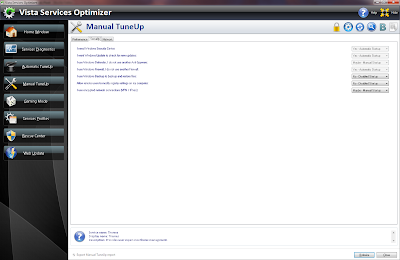

Here they are (Manual Optimization settings. Click to enlarge):


Thursday, November 19, 2009
What is Google Chrome OS?
Today Google open-sourced Chromium OS project, but it will be available for customers this time next year. There are no conventional desktop applications and everything takes place within the browser. They really focus on the boot time and try to convince users that they don't need a full operating system since most user only need (and mostly use) a browser.
There is also a video that tells a few things about Google Chrome OS.
For more information, visit the original Google Blog (Releasing the Chromium OS open source project) and Chromium OS website (http://www.chromium.org/chromium-os).
There is also a video that tells a few things about Google Chrome OS.
For more information, visit the original Google Blog (Releasing the Chromium OS open source project) and Chromium OS website (http://www.chromium.org/chromium-os).
Friday, November 6, 2009
Virtual Machines
If you know about virtual machines (that lets you run another operating system on top of one, at the same time), then you probably know about VMware. Their products are mostly paid, but they have a free VMware Player which can run virtual machines created by others. Yet, you cannot even easily modify the virtual machine settings such as the amount of memory.
A competitive free alternative to VMware is Sun VirtualBox. Since version 3 of VirtualBox, their performance benchmarks are similar, it also supports multiple virtual CPUs, shared folders between the guest machine and the host, and various operating systems. It has a very nice seamless mode, similar to VMware Fusion on Mac, that windows from both machines are displayed on the same desktop. With VirtualBox tools, seamless mouse and keyboard integration is perfect. You can create your own virtual machines, or download pre-made images.
Hint: Use fixed-size virtual hard disks. With dynamic ones, the hard disk gets big fast, and then there are painful tricks to shrink the size, and they don't always work. You can always add more virtual hard disks later on.
A competitive free alternative to VMware is Sun VirtualBox. Since version 3 of VirtualBox, their performance benchmarks are similar, it also supports multiple virtual CPUs, shared folders between the guest machine and the host, and various operating systems. It has a very nice seamless mode, similar to VMware Fusion on Mac, that windows from both machines are displayed on the same desktop. With VirtualBox tools, seamless mouse and keyboard integration is perfect. You can create your own virtual machines, or download pre-made images.
Hint: Use fixed-size virtual hard disks. With dynamic ones, the hard disk gets big fast, and then there are painful tricks to shrink the size, and they don't always work. You can always add more virtual hard disks later on.
Subscribe to:
Posts (Atom)


 Posts
Posts

